QuakeLogic Blog Archive

Shake Tables in Structural Engineering: Types and Applications

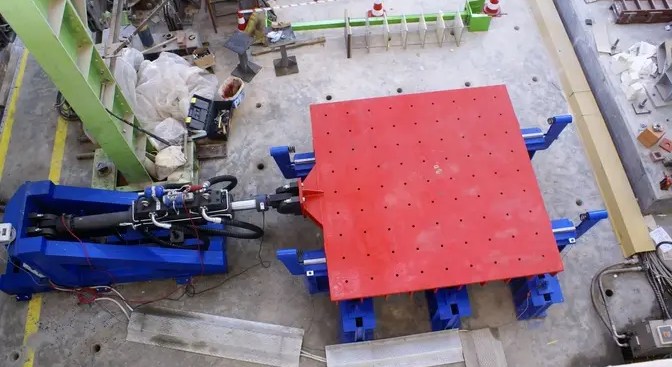
High-capacity QuakeLogic shake table used for seismic testing of structural models

In short: Shake tables in structural engineering are platforms that reproduce earthquake ground motion so engineers can observe how buildings, bridges and equipment respond before a real event. They come in electrodynamic, hydraulic and servo-hydraulic types, and in uniaxial (one axis) or biaxial (two simultaneous axes) configurations. Test results feed building codes, verify retrofits of older structures and qualify critical infrastructure such as bridges, dams and nuclear facilities.

In the realm of structural engineering, ensuring safety and resilience in construction is of utmost importance. One of the most vital tools aiding engineers in this endeavor is the shake table. Shake tables are pivotal in the seismic testing of structures, providing invaluable data that helps engineers design buildings capable of withstanding earthquakes. This blog explores the intricacies of shake tables, their functions, their significance in structural engineering, and the differences between uniaxial and biaxial shake tables.

What is a Shake Table?

A shake table is a device used to simulate the ground motions produced by earthquakes. By replicating the oscillatory motion of seismic waves, shake tables enable engineers to observe how structures respond to these forces. This testing is essential for understanding the behavior of buildings and other structures during seismic events and for developing strategies to enhance their earthquake resistance.

Types of Shake Tables

  1. Electrodynamic Shake Tables:
    These tables use electromagnets to generate motion. Known for their precision, they are often used for smaller-scale models and detailed studies.
  2. Hydraulic Shake Tables:
    Driven by hydraulic actuators, these tables are suitable for larger structures and more significant displacement tests. They are highly effective in simulating a wide range of seismic activities.
  3. Servo-Hydraulic Shake Tables:
    Combining the benefits of hydraulic systems with advanced control systems, these tables offer precise and powerful simulations. They are commonly used in both academic research and industrial applications.

Uniaxial vs. Biaxial Shake Tables

Uniaxial Shake Tables:

Uniaxial shake tables simulate ground motion along a single axis, typically either the X or Y axis. They are simpler and more cost-effective, making them ideal for basic testing and educational purposes. However, their limitation to one axis means they cannot fully replicate the complex, multidirectional nature of real earthquakes.

Biaxial Shake Tables:

Biaxial shake tables can simulate ground motion along two axes simultaneously, usually the X and Y axes. This capability provides a more comprehensive analysis of how structures will behave during seismic events. Biaxial tables offer a more realistic simulation of earthquake conditions, making them invaluable for advanced research and critical infrastructure testing.

The Role of Shake Tables in Structural Engineering

Seismic Testing

Shake tables allow engineers to subject structural models to realistic earthquake scenarios. By analyzing the performance of these models, engineers can identify potential weaknesses and improve design strategies. Seismic testing on shake tables provides critical data that informs building codes and construction practices, ensuring structures are built to withstand future earthquakes.

Research and Development

In research settings, shake tables are indispensable. They enable the exploration of new materials, innovative design concepts, and construction techniques. Universities and research institutions worldwide utilize shake tables to push the boundaries of structural engineering knowledge.

Performance Evaluation

Beyond initial design and research, shake tables are used to evaluate the performance of existing structures. Retrofitting and upgrading older buildings to meet modern seismic standards often involve shake table testing to ensure the effectiveness of proposed improvements.

Advantages of Using Shake Tables

  1. Realistic Simulation:
    Shake tables provide a highly realistic simulation of earthquake motions, offering valuable insights that static analysis cannot.
  2. Safety and Risk Reduction:
    By identifying potential failures before they occur in real-world scenarios, shake table testing significantly reduces the risk of structural collapse and enhances public safety.
  3. Cost-Effectiveness:
    Although constructing and maintaining shake tables can be expensive, the cost is justified by the savings from preventing structural failures and minimizing damage during actual earthquakes.
  4. Regulatory Compliance:
    Shake table testing helps ensure that structures comply with stringent building codes and regulations, promoting safer construction practices.

Applications of Shake Tables

Academic Research

Universities and academic institutions use shake tables to conduct fundamental research in seismic engineering. These studies contribute to the development of new theories and models that advance the field.

Commercial Construction

In the commercial sector, shake tables are used to test the seismic resilience of various building designs. This testing is crucial for developing safe and reliable structures, particularly in earthquake-prone regions.

Government and Regulatory Bodies

Government agencies and regulatory bodies utilize shake table data to formulate and update building codes and standards. This ensures that new constructions adhere to the latest safety guidelines.

Industrial Applications

Industries involved in infrastructure development, such as bridges, dams, and nuclear facilities, rely on shake table testing to evaluate the seismic performance of their projects. This testing is essential for ensuring the structural integrity and safety of critical infrastructure.

Conclusion

Shake tables are a cornerstone of modern structural engineering, providing essential data that helps engineers design safer and more resilient buildings. Through realistic simulation of earthquake motions, shake tables enable comprehensive seismic testing, research, and performance evaluation. As the field of structural engineering continues to evolve, the role of shake tables in enhancing public safety and advancing construction practices remains indispensable. By leveraging the capabilities of shake tables, engineers can build a safer future, one structure at a time.

QL ATOM youtube for "Unlocking Seismic Safety: The Power of Shake Tables in Structural Engineering"

For Sales, Contact Us

Join industry leaders in leveraging this powerful tool to drive innovation and safety in engineering. For more information on how our tables can benefit your projects and research initiatives, visit us

Small and medium size shake tables

Large scale shake tables

email us scaled for "Revolutionize Your Research with an Affordable Shake Table"

Xontact us at sales@quakelogic.net or or call us at +1-916-899-0391

Watch our YouTube videos at YouTube/QuakeLogic.

Key Takeaways

  • Electrodynamic tables use electromagnets for precise small-scale tests; hydraulic and servo-hydraulic tables handle larger structures and displacements.
  • Uniaxial tables shake along one axis and cost less; biaxial tables drive X and Y simultaneously for more realistic earthquake simulation.
  • Shake table data informs building codes, retrofit verification of older buildings and seismic qualification of bridges, dams and nuclear facilities.
  • Realistic motion simulation reveals failure modes that static analysis cannot, reducing collapse risk and supporting regulatory compliance.

Frequently Asked Questions

What is a shake table used for in structural engineering?

A shake table simulates the oscillatory ground motion of an earthquake so engineers can observe how a structural model or piece of equipment responds. Uses include seismic testing of new designs, research into materials and construction techniques, evaluating retrofits of existing buildings, and generating data that informs building codes and regulatory standards in earthquake-prone regions.

What is the difference between uniaxial and biaxial shake tables?

A uniaxial shake table moves along a single axis, usually X or Y; it is simpler and cheaper and suits basic testing and teaching but cannot reproduce multidirectional earthquake motion. A biaxial table drives two axes simultaneously, typically X and Y, giving a more realistic simulation for advanced research and critical infrastructure testing where directional effects matter.

What types of shake tables are there?

The main types are electrodynamic tables, which use electromagnets and are prized for precision in smaller-scale models; hydraulic tables, driven by hydraulic actuators for larger structures and bigger displacements; and servo-hydraulic tables, which pair hydraulic power with advanced control for precise, powerful simulations in academic and industrial labs. Tables are further classed by axis count as uniaxial, biaxial or triaxial.

Why is shake table testing worth the cost?

Building and maintaining a shake table is expensive, but it is the only way to subject a structure to realistic earthquake loading before an actual event. Testing exposes weaknesses that static analysis misses, reduces the risk of collapse, validates retrofits and demonstrates compliance with seismic building codes. The avoided cost of structural failure and post-earthquake damage justifies the investment.

Who uses shake tables?

Universities use shake tables for fundamental seismic engineering research. Commercial builders test the resilience of building designs in earthquake-prone regions. Government and regulatory bodies use test data to write and update building codes. Industries responsible for bridges, dams and nuclear facilities rely on shake table testing to verify the seismic performance of critical infrastructure before and after construction.

Need help with a project? QuakeLogic designs and supplies seismic monitoring, earthquake early warning, structural health monitoring, infrasound, and shake table systems. Browse QuakeLogic products or contact our engineering team with your site, structure, or test requirements.

Biaxial Shake Table for Seismic Testing Across Industries

QuakeLogic biaxial shake table with two-axis actuators for seismic testing

In short: A biaxial shake table reproduces earthquake motion along two axes simultaneously, so engineers can test buildings, bridge and dam models, soil-structure interaction, materials, aerospace and mechanical components, and defense equipment under realistic dynamic loads. QuakeLogic's table uses high-performance actuators, advanced controls that run waveforms, sine sweeps and complex sequences, and a simple interface; users include Caltech, University of Nevada, Nokia Bell Labs and Nantes University.

At QuakeLogic, we are dedicated to pushing the boundaries of innovation and safety in engineering. Our Biaxial Shake Table is a testament to this commitment, offering unparalleled capabilities for seismic testing and dynamic analysis. This state-of-the-art equipment is designed to meet the rigorous demands of various industries, providing precise and customizable simulation of seismic events. Let’s explore the features, potential use cases, and benefits of our Biaxial Shake Table across different sectors.

Visit the product page HERE.

bi axial youtube 3 for "Biaxial Shake Table: Revolutionizing Seismic Testing Across Industries"

Key Features

  • High-Performance Actuators: The Biaxial Shake Table is equipped with advanced actuators that deliver accurate and dynamic seismic simulations, ensuring reliable data for analysis.
  • Advanced Control Systems: Our control systems allow for precise and customizable test scenarios, accommodating a wide range of research and testing needs.
  • User-Friendly Interface: Designed with ease of use in mind, the interface simplifies the setup and operation, making it accessible to users of all experience levels.
  • Versatile Vibration Patterns: Easily create different vibration patterns, including waveforms, sine waves, and other complex sequences to simulate real-world conditions.

Potential Use Cases

Earthquake Engineering

  • Building Safety: Test and evaluate the seismic resilience of buildings, ensuring they meet safety standards and can withstand earthquakes.
  • Infrastructure Analysis: Assess the stability and performance of bridges, dams, and other critical infrastructure during seismic events.

Structural Engineering

  • Material Testing: Analyze the behavior of various construction materials under dynamic loads to optimize structural designs.
  • Retrofitting Solutions: Develop and test retrofitting techniques to enhance the earthquake resistance of existing structures.

Geotechnical Engineering

  • Soil-Structure Interaction: Study how soil and foundation interact during seismic activity to improve foundation designs.
  • Landslide Mitigation: Investigate the effects of earthquakes on slopes and develop effective landslide prevention strategies.

Aerospace Engineering

  • Component Testing: Evaluate the performance of aerospace components under dynamic loads, ensuring they can withstand extreme conditions.
  • Vibration Analysis: Conduct detailed vibration analysis to improve the design and safety of aerospace structures.

Mechanical Engineering

  • Machine Performance: Test the resilience and reliability of mechanical systems and machinery under dynamic conditions.
  • Vibration Isolation: Develop and test vibration isolation techniques to protect sensitive equipment from seismic activity.

Material Engineering

  • Material Fatigue: Study the fatigue behavior of materials under cyclic loads to enhance their durability and performance.
  • Innovative Materials: Test new and advanced materials for their seismic resilience and dynamic properties.

Defense Industry

  • Equipment Testing: Ensure military equipment and installations can withstand seismic events and other dynamic loads.
  • Infrastructure Safety: Evaluate the seismic resilience of critical defense infrastructure to maintain operational readiness during and after seismic events.

Why Choose QuakeLogic’s Biaxial Shake Table?

  • Precision and Accuracy: Our shake table delivers precise and accurate simulations, providing reliable data for research and testing.
  • Versatility: Suitable for a wide range of industries and applications, our shake table can handle diverse testing requirements.
  • Innovation and Reliability: Trusted by leading institutions and organizations worldwide, our shake table represents the pinnacle of innovation and reliability in seismic testing.
bia axial pdf for "Biaxial Shake Table: Revolutionizing Seismic Testing Across Industries"

Recent Clients

We are proud to have our Biaxial Shake Table selected by esteemed institutions and organizations, including:

  • NOKIA-BELLS-LAB, USA
  • Caltech University, USA
  • University of Nevada, USA
  • Southern Illinois University, USA
  • American University of Sharjah, UAE
  • Krakov University of Technology, Poland
  • Nantes University in France
  • And many others!

For Sales, Contact Us

Join industry leaders in leveraging this powerful tool to drive innovation and safety in engineering. For more information on how our Biaxial Shake Table can benefit your projects and research initiatives, contact us at sales@quakelogic.net or call us at +1-916-899-0391

QL customer satisfaction for "Biaxial Shake Table: Revolutionizing Seismic Testing Across Industries"

Conclusion

QuakeLogic’s Biaxial Shake Table is an indispensable tool for advancing research and safety across various engineering disciplines. With its advanced features and versatile applications, it stands as a cornerstone in the pursuit of seismic resilience and dynamic analysis. Discover the future of seismic testing with QuakeLogic.

Key Takeaways

  • Two-axis motion with high-performance actuators and a control system that runs recorded earthquake waveforms, sine waves and custom sequences.
  • Earthquake and structural engineering uses: building seismic resilience, bridge and dam stability, material behavior and retrofit validation.
  • Geotechnical uses: soil-structure interaction and landslide mitigation studies under simulated shaking.
  • Aerospace, mechanical, materials and defense uses: component qualification, vibration isolation, fatigue under cyclic loads and equipment readiness.
  • Installed at Nokia Bell Labs, Caltech, University of Nevada, Southern Illinois University, American University of Sharjah, Krakow and Nantes.

Frequently Asked Questions

What is a biaxial shake table used for?

A biaxial shake table is used to subject structures, models and equipment to controlled two-axis seismic motion. Applications include testing building seismic resilience, bridge and dam stability, material behavior under dynamic load, retrofit techniques, soil-structure interaction, aerospace and mechanical component qualification, vibration isolation, material fatigue and the readiness of defense equipment during earthquakes.

How does a biaxial shake table differ from a uniaxial one?

A biaxial shake table moves the test platform along two orthogonal horizontal axes at the same time, while a uniaxial table moves along a single axis. Two-axis motion reproduces real earthquake ground motion more faithfully, which is why standards such as AC156 prefer it for qualifying components. Uniaxial tables remain adequate for simpler specimens or single-direction studies.

What motion inputs can QuakeLogic's biaxial shake table run?

QuakeLogic's biaxial shake table can run recorded earthquake waveforms, sine waves and other complex sequences. Its advanced control system allows precise, customizable test scenarios, and the user-friendly interface simplifies setup and operation so researchers of any experience level can configure and execute tests.

Which institutions use QuakeLogic's biaxial shake table?

QuakeLogic's biaxial shake table has been selected by Nokia Bell Labs, Caltech, the University of Nevada and Southern Illinois University in the United States, the American University of Sharjah in the UAE, Krakow University of Technology in Poland and Nantes University in France, among others.

Can a biaxial shake table test non-civil components such as aerospace parts?

Yes. Beyond civil structures, a biaxial shake table is used to evaluate aerospace components under dynamic loads, perform vibration analysis of aerospace structures, test the resilience of mechanical systems and machinery, develop vibration isolation for sensitive equipment, study material fatigue under cyclic loading and verify that military equipment and installations withstand seismic and other dynamic events.

Need help with a project? QuakeLogic designs and supplies seismic monitoring, earthquake early warning, structural health monitoring, infrasound, and shake table systems. Browse QuakeLogic products or contact our engineering team with your site, structure, or test requirements.

Configure and Troubleshoot NTP on OpenWrt Seismic Data Loggers

Terminal with UCI commands configuring NTP time sync on an OpenWrt seismic data logger

In short: To configure NTP on OpenWrt seismic data loggers, SSH in as root, add servers with uci add_list system.ntp.server='0.lede.pool.ntp.org' (repeat for 1 to 3), run uci commit system, restart with /etc/init.d/sysntpd restart, confirm with date, and enable at boot with /etc/init.d/sysntpd enable. For a one-off sync, stop sysntpd and run ntpd -q -p 0.lede.pool.ntp.org. If ntpd reports 'bad address', fix DNS or sync by IP.


1. SSH into Your OpenWrt Device

Open a terminal and SSH into your OpenWrt device:

ssh root@<your_openwrt_device_ip>

2. Verify NTP Configuration

Check the current NTP configuration:

uci show | grep ntp

3. Add NTP Servers to UCI Configuration

Add the NTP servers to the UCI system configuration:

uci add_list system.ntp.server='0.lede.pool.ntp.org'
uci add_list system.ntp.server='1.lede.pool.ntp.org'
uci add_list system.ntp.server='2.lede.pool.ntp.org'
uci add_list system.ntp.server='3.lede.pool.ntp.org'

4. Commit the Changes

Apply the changes to the configuration:

uci commit system

5. Restart the NTP Service

Restart the NTP service to apply the new configuration:

/etc/init.d/sysntpd restart

6. Verify Time Synchronization

Check the current date and time settings to ensure synchronization is working:

date

7. Ensure NTP Service Starts on Boot

Enable the NTP service to start on boot:

/etc/init.d/sysntpd enable

By following these steps, your OpenWrt device will be configured to use the specified NTP servers, and the system time will be synchronized correctly.


Manually Sync Time with an NTP Server

1. SSH into Your OpenWrt Device

Open a terminal and SSH into your OpenWrt device:

ssh root@<your_openwrt_device_ip>

2. Stop the NTP Service

Stop the NTP service to avoid conflicts:

/etc/init.d/sysntpd stop

3. Manually Sync Time with an NTP Server

Use the ntpd command to manually sync the time with an NTP server:

ntpd -q -p 0.lede.pool.ntp.org

The -q option tells ntpd to set the time and quit, and the -p option specifies the NTP server.

4. Start the NTP Service Again

Start the NTP service to resume automatic synchronization:

/etc/init.d/sysntpd start

5. Verify Time Synchronization

Check the current date and time to ensure it has been updated correctly:

date

By following these steps, you can manually sync the time on your OpenWrt device with a specific NTP server.


Troubleshooting “ntpd: bad address ‘0.lede.pool.ntp.org'”

1. Check DNS Configuration

Ensure your OpenWrt device can resolve domain names correctly:

ping google.com

If this fails, you might need to configure your DNS settings manually in the /etc/config/network file:

uci set network.wan.dns='8.8.8.8 8.8.4.4'
uci commit network
/etc/init.d/network restart

2. Verify NTP Package Installation

Ensure that the ntpd package is installed:

opkg update
opkg install ntpd

3. Manually Sync Time Using ntpd with IP Address

If DNS issues persist, use the IP address of the NTP server instead of the hostname:

ntpd -q -p 162.159.200.123

4. Ensure NTP Servers Are Correctly Configured in UCI

Check and reconfigure the NTP servers if necessary:

uci show system.ntp
uci delete system.ntp.server
uci add_list system.ntp.server='0.lede.pool.ntp.org'
uci add_list system.ntp.server='1.lede.pool.ntp.org'
uci add_list system.ntp.server='2.lede.pool.ntp.org'
uci add_list system.ntp.server='3.lede.pool.ntp.org'
uci commit system

5. Restart the NTP Service

Restart the NTP service to apply the changes:

/etc/init.d/sysntpd restart

By following these steps, you should be able to resolve the “ntpd: bad address ‘0.lede.pool.ntp.org'” error and ensure your OpenWrt device can correctly sync time with the NTP servers.


By following these organized steps, you should be able to configure, manually sync, and troubleshoot NTP settings on your OpenWrt device effectively.

For questions, reach us at support@quakelogic.net. Our working hours are 8 AM to 5 PM Pacific Time (M-F).

Key Takeaways

  • Add servers with uci add_list system.ntp.server='0.lede.pool.ntp.org' through 3.lede.pool.ntp.org, then uci commit system.
  • Restart with /etc/init.d/sysntpd restart and enable at boot with /etc/init.d/sysntpd enable.
  • Manual sync: stop sysntpd, run ntpd -q -p <server> (set time and quit), then start sysntpd again.
  • 'ntpd: bad address' usually means DNS failure; test with ping google.com and set DNS via uci set network.wan.dns.
  • If DNS stays broken, sync against an IP address such as ntpd -q -p 162.159.200.123.

Frequently Asked Questions

How do I configure NTP servers on OpenWrt using UCI?

SSH into the device as root, check the current settings with uci show | grep ntp, then add servers with uci add_list system.ntp.server='0.lede.pool.ntp.org' and repeat for 1, 2 and 3.lede.pool.ntp.org. Save with uci commit system, restart the daemon with /etc/init.d/sysntpd restart, verify with date, and make it persistent across reboots with /etc/init.d/sysntpd enable. The logger will then keep time from the configured pool.

How do I manually sync time on OpenWrt with ntpd?

Stop the running service first to avoid conflicts with /etc/init.d/sysntpd stop, then run ntpd -q -p 0.lede.pool.ntp.org. The -q flag tells ntpd to set the clock once and quit, and -p names the server. Confirm the new time with date, then restart automatic synchronization with /etc/init.d/sysntpd start. This is useful after a long power outage when the clock is far off.

What causes the 'ntpd: bad address 0.lede.pool.ntp.org' error on OpenWrt?

The error means the device cannot resolve the NTP server hostname, almost always a DNS problem. Test with ping google.com; if that fails, set DNS manually with uci set network.wan.dns='8.8.8.8 8.8.4.4', uci commit network and /etc/init.d/network restart. Also confirm the package is installed (opkg update, opkg install ntpd) and that the server list in uci show system.ntp is correct. As a workaround, sync by IP: ntpd -q -p 162.159.200.123.

How do I check that NTP is working on an OpenWrt device?

Run date and confirm the reported time and date match a trusted clock; a wrong year or epoch time means synchronization has not happened. Inspect the configured servers with uci show system.ntp, and make sure the service is enabled at boot with /etc/init.d/sysntpd enable. If the time is stale, restart the daemon with /etc/init.d/sysntpd restart or force an immediate update with ntpd -q -p <server>.

Why does accurate NTP time matter on a seismic data logger?

Seismic analysis depends on comparing arrival times across stations: locating an event, measuring phase arrivals and aligning channels all assume every logger stamps samples with the same reference time. A logger with a drifting or unset clock produces records that cannot be correlated with the rest of the network. Keeping NTP configured, persistent across reboots and resolvable through DNS ensures a Linux-based logger stays within acceptable timing error.

Need help with a project? QuakeLogic designs and supplies seismic monitoring, earthquake early warning, structural health monitoring, infrasound, and shake table systems. Browse QuakeLogic products or contact our engineering team with your site, structure, or test requirements.